SQL Injection: Prevention, Detection, and Recovery
SQL Injection can damage your website's data and spread to other sites in your organization. This article explains how it works and how you can prevent it.
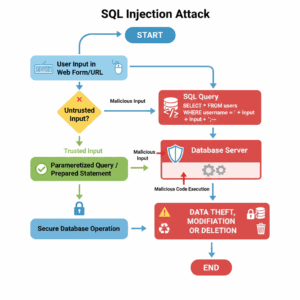

Essential Steps to Prevent SQL Injection in ColdFusion
• Parameterize Queries: Always use CFQueryParam for dynamic values in CFQuery tags to block injection attempts.
• Validate Inputs: Filter URL and form variables with regex or whitelists at the application level, but never rely on this alone.
• Apply Least Privilege: Limit database account permissions to read/write only what's necessary, reducing damage if breached.
• Layer Defenses: Implement web application firewalls (WAFs), daily backups, and secure error handling for comprehensive protection.
• Scan for Vulnerabilities: Use tools like QueryParam Scanner to audit code and identify unparameterized queries.
Exploited Vulnerabilities
SQL Injection attacks rely on someone sending an HTTP request (web site visitor) being able to add SQL commands to a URL or form variable, and have it sent in a SQL query so that the SQL Server runs it as another SQL command. Any text passed along in URL or form variables can be modified by the user or automated. URL/Form variables should only be treated as data and never trusted. (See http://www.forta.com/blog/index.cfm/2005/12/21/SQL-Injection-Attacks-Easy-To-Prevent-But-Apparently-Still-Ignored for a quick description).
If text entered in the URL can get run on the database server as a SQL command, then a malicious user can pass any SQL commands that that SQL login has access to, including:
- Making malicious edits
- Reading from system tables for the database
- Bypassing site login code
- Possibly creating or deleting tables (if the SQL login has permissions)
Automated Attack Patterns
Over the past few months (since about May 2008), there has been an automated SQL Injection attack running against first just ASP sites, then others, and now ColdFusion sites (searching for URLs containing “.cfm” files). It tries to pass a SQL script in a URL variable to each page, on the hope that at least some pages will pass it directly to the database in a way that the database server will execute them. (See http://www.coldfusionmuse.com/index.cfm/2008/7/18/Injection-Using-CAST-And-ASCII for details on how this SQL works.)
The malicious SQL script used in this attack:
- Loops over system tables (sysobjects, syscolumns) to find character fields in all user tables
- Appends an HTML string to all character fields, assuming that at least some of those columns will be output directly on some other web page
- Includes a JavaScript block, which will get the browser to download and run that JavaScript URL (this JS URL will probably change quite often, but will be available enough to be downloaded)
- Turns the browser hitting the page displaying that data into a “bot” to hit other servers and can do anything that Javascript in the browser can do, especially exploiting browser vulnerabilities
It only requires successfully hitting one page on one site to get into that database, then the HTML would be displayed on whatever site uses those tables and columns.
Prevention Best Practice
The best way to prevent SQL injection is to make sure any data passed to SQL queries is only treated as data. All CF Queries should be parameterized (use CFQueryparam to pass the values in).
Action Taken for Containment
The best permanent fix is for each and every query to be parameterized, so that no user-supplied text is passed to the database directly.
There are some ways to block some of the SQL keywords in URL and form variables; this is not guaranteed to match and may have some false positives, but will buy time to protect all queries.
We set up some CF code on most public sites, set up in Application.cfm (runs at beginning of each request) to search for these SQL keywords in the URL and then abort the page.
Action Taken for Resolution and Recovery
Permanent Fix
The best permanent fix is for each and every query to be parameterized, so that no user-supplied text is passed to the database directly.
Interim Measures
In the meantime, block those SQL keywords either through:
- CF code (we put on most public sites)
- Rewrite rules
Database Recovery
To repair the infected database, we are running a SQL script similar to the injected SQL to remove the appended HTML from those columns it was added to.
Further Recommendations
Backup and Security Audits
- Have daily backups of all databases
- Regular backups of code
- Do a security audit on your site (TeraTech can do this)
- Better CF regex filtering of URL/form variables at application level
Content Filtering Solutions
Application Level Filtering
Better CF regex filtering of URL/form variables at application level
- May block this set of attacks enough to buy time
- Not a replacement for parameterizing all queries
Web Server Level Filtering (Rewrite Rules)
Blocking on webserver level, using rewrite rules. We haven't quite found a set of rules that work reliably, but will keep looking.
- May block this set of attacks enough to buy time
- Not a replacement for parameterizing all queries
Available options:
- Open-source Ionics ISAPI rewrite filter http://www.codeplex.com/IIRF/
- Filter requires a copy of the DLL and INI file in separate folder for each site
- Then point each site to that DLL
- Helicon ISAPI Rewrite (commercial) http://www.isapirewrite.com/
- Backup the rule configuration files
Application Firewall Solutions
Optionally, look at an application firewall that can block certain types of requests. Rules are options. Not guaranteed to block everything and can have false positives, but protects the whole server and individual sites, and is highly configurable. Again, not a replacement for parameterizing all queries.
- Applicure dotDefender, ₱4,000 for a server
Code-Level Recommendations
- Each and every query should pass variables to database using CFQueryParam. Use QueryParam scanner (http://qpscanner.riaforge.org/) on source folders to find queries that might be missing.
- Any code that uses URL or Form-supplied values to determine SQL columns or sort order should check against a list of valid columns, etc. Don't use those values directly in the query without checking.
- If you have cached queries that get user-entered values, CF before 8.01 doesn't allow caching queries that use cfqueryparam. Consider other options, like caching the query without that WHERE clause and then doing a query on that query.
- Validate form fields; check values of ID fields entered in URL before getting to query, then display nicer message to user and don't need to send an error message.
Resources
Technical Articles
- Good description on how this attack works: http://www.coldfusionmuse.com/index.cfm/2008/7/18/Injection-Using-CAST-And-ASCII
- Ben Forta's blog:
Security Tools
- QueryParam scanner (search CF code for queries that are probably missing cfqueryparam): http://qpscanner.riaforge.org/
- HP Scrawlr(finds web pages vulnerable to SQL injection attacks on your own sites): http://www.communities.hp.com/securitysoftware/blogs/spilabs/archive/2008/06/23/finding-sql-injection-with-scrawlr.aspx
If you'd like to learn more…

FAQs About Preventing SQL Injection Attacks (SQLi)
What is an SQL Injection (SQLi) attack and how does it work?
An SQL Injection (SQLi) attack is a type of code injection vulnerability that occurs when an attacker can interfere with the queries that an application makes to its database. It typically works by inserting malicious SQL code into an input field, like a login form or a URL parameter, that the vulnerable application executes as part of its own SQL command.
This allows the attacker to:
- View, modify, or delete data
- Bypass login security
- Execute commands on the database server (if the database login has sufficient permissions)
The core vulnerability is treating untrusted user input as executable code rather than just data.
What is the most effective way to prevent SQL Injection attacks?
The most effective, permanent solution is to use Prepared Statements with Parameterized Queries for all database calls that include user-supplied input.
This technique separates the SQL code from the user input. The application first defines the SQL structure with placeholders, and then the database is instructed to treat the content of the parameters (user input) as literal data only, never as executable SQL commands. This prevents any malicious code injected by a user from altering the query's intent. For ColdFusion sites, this is best achieved using CFQueryparam on all dynamic values.
Can input validation or filtering prevent all SQLi attacks?
No. While input validation and filtering are important defense layers, they help by checking values against expected format, type, or length, they are not a complete defense against SQLi.
Clever attackers can often find ways to evade blacklists (lists of forbidden keywords like OR, SELECT, etc.) through techniques like encoding or using different syntax. The article's recommendation to filter URL and form variables is a temporary measure to “buy time” but should never replace parameterizing all queries, as noted by security experts like Ben Forta.
What is the Principle of Least Privilege in the context of SQLi prevention?
The Principle of Least Privilege (PoLP) means that every user, program, or process should have only the minimum permissions necessary to perform its intended job.
For a web application connecting to a database, this means the database account should not have administrator or overly broad privileges, like DROP TABLE or unnecessary INSERT/UPDATE/DELETE permissions. If an attacker successfully compromises the database through SQLi, their ability to inflict damage, such as reading system tables or corrupting data, is severely limited by the restricted permissions of the compromised account. This is a critical defensive layer, as highlighted in the OWASP SQL Injection Prevention Cheat Sheet.
What other security measures should be implemented alongside parameterized queries?
In addition to parameterized queries and the Least Privilege principle, you should implement a layered defense:
- Web Application Firewalls (WAFs): These can filter out suspicious traffic and common SQLi attack patterns before they reach your application.
- Secure error-handling: Configure your application to provide generic error messages to the user. Detailed database error messages can expose valuable information about your database structure to an attacker, aiding in their exploitation attempts.
- Regular audits and updates: Keep all software components, including the database server, web server, and application frameworks, patched and up-to-date to fix known vulnerabilities.
- Daily backups: Maintain daily backups of all databases to ensure you can quickly recover the system in case a successful attack occurs.
How can I identify if my ColdFusion application is vulnerable?
You can use security tools designed for code analysis. The article specifically mentions the QueryParam Scanner from RIAForge. This tool helps developers scan their source code folders to quickly locate CF queries that are not using CFQueryParam, pinpointing potential vulnerabilities that need immediate remediation.



