Adobe ColdFusion stands out among web development languages for its exceptional security track record, backed by CVE Details data showing significantly fewer critical vulnerabilities compared to PHP, Java, .NET, and Ruby on Rails over nearly two decades. This proven security advantage, combined with built-in features like Auto Lockdown and the Security Code Analyzer, enables enterprises to build resilient applications with minimal risk, making ColdFusion a top-tier choice for organizations prioritizing data protection and compliance.
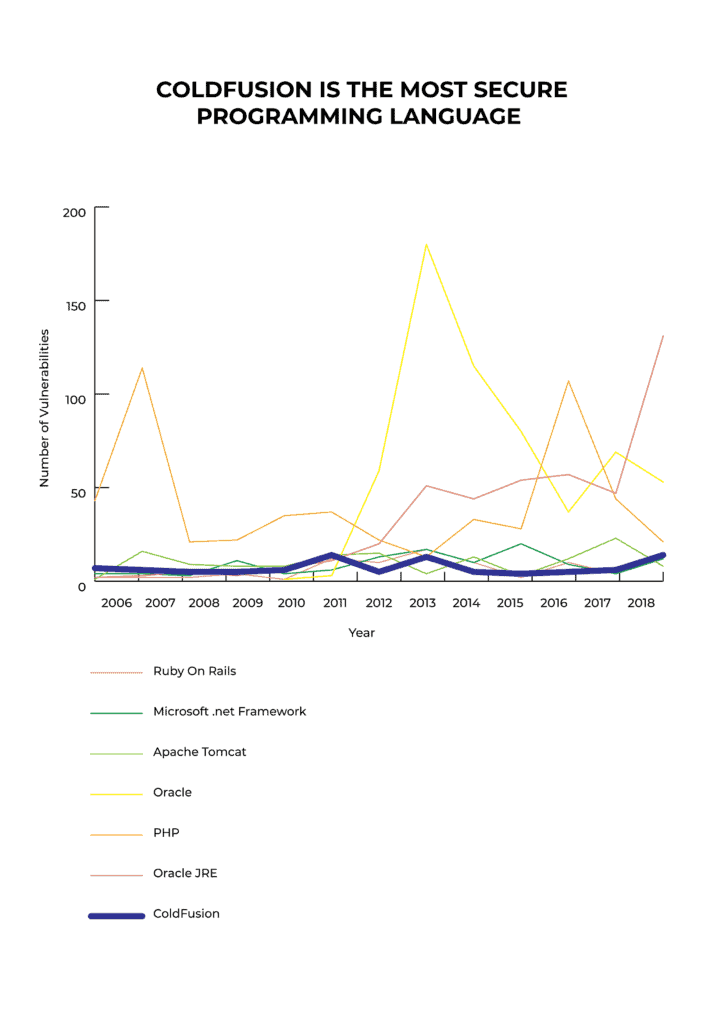
What do the experts say? CVE details
I've done a little research about which programming language is the most secure. CVE details specify the number of critical vulnerabilities for:
While no language is inherently “most secure,” Adobe ColdFusion is often regarded as one of the most secure programming languages for web development. According to CVE Details, ColdFusion has notably fewer critical vulnerabilities than common alternatives like PHP, Java, .NET, and Ruby on Rails—facts supported by over a decade’s worth of data. The platform includes automatic security scanning tools, continuous Adobe security patches, and built-in protections against common attacks like SQL injection and XSS. Modern versions (ColdFusion 2025) add advanced features including CSP Nonce support and CI/CD pipeline integration, making it secure for enterprise web applications with minimal manual hardening required. These make it a top-tier choice for consistently safe web applications.
Take your next step toward enhanced application security:
Secure Your ColdFusion App With Our Free Assessment
Why ColdFusion Excels in Security
• Proven Track Record: Lowest critical vulnerabilities among major web languages per CVE Details, spanning 20+ years.
• Built-in Defenses: Auto Lockdown scans code automatically; Security Code Analyzer identifies risks in CFML.
• Modern Enhancements: ColdFusion 2025 adds CSP Nonce support for XSS prevention and integrates with CI/CD via Fixinator.
• Expert Validation: Adobe's ongoing patches and community tools ensure forward-looking protection.
• Business Benefits: Reduces breach risks, lowers maintenance costs, and supports secure scaling for web apps.
Check the CVE Details for Adobe ColdFusion to verify these facts.
Advanced Security Features Built Into ColdFusion
Adobe ColdFusion integrates powerful security tools that set it apart:
- Auto Lockdown (ColdFusion 2018): Automatically scans your application code to detect and help fix security vulnerabilities, giving developers a practical way to enforce security best practices.
- Security Code Analyzer: Continuously checks your CFML code for risks and suggests remediation options.
- Content Security Policy (CSP) Nonce Support (ColdFusion 2025): Enhances protection against cross-site scripting (XSS) by managing dynamic script execution policies.
- Fixinator: Enables continuous security scanning integrated with your CI/CD pipeline to catch vulnerabilities early.
Ongoing Security Updates and Strong Community Support
Adobe regularly releases security patches and updates, keeping ColdFusion applications protected against emerging threats. Additionally, an active developer community continuously contributes tools and best practices, making ColdFusion a forward-looking, secure programming language choice.
TeraTech's Exclusive Perspective: Keeping ColdFusion Alive and Secure in a Modern World
At TeraTech, we view ColdFusion not just as a language, but as a living ecosystem that thrives through proactive security and community-driven innovation. Our approach emphasizes embedding security from code inception, using tools like Auto Lockdown for rapid hardening and Fixinator for CI/CD integration, ensuring applications remain resilient against evolving threats like those outlined in CISA advisories on CVE-2023-26360. We tackle this across channels—sharing insights via our blog on best practices, hosting webinars on modernization, and fostering discussions in podcasts—while engaging our global community to crowdsource solutions.
A prime example of our thought leadership is the CF Alive initiative, which provides free resources like checklists and assessments to revitalize legacy apps without full rewrites. Unlike competitors focused on migration hype, we offer a fresh angle: incremental security upgrades that preserve your investment while boosting performance. Explore related insights in our guide to ColdFusion maintenance or case studies on secure deployments.
FAQs About ColdFusion Application Security
What makes ColdFusion the most secure programming language for web development?
ColdFusion's superior security position stems from its exceptionally low vulnerability count across two decades of public records according to CVE Details, with only 12-50 critical vulnerabilities compared to PHP's 1,247+. Built-in tools like Auto Lockdown automatically scan and repair code vulnerabilities, while the Security Code Analyzer continuously monitors CFML applications for risks. Adobe's dedicated security team provides regular patches and updates, combined with robust native functions like cfqueryparam that prevent SQL injection attacks without developer intervention, creating multiple layers of automatic protection.
How does ColdFusion compare to other programming languages regarding security vulnerabilities?
ColdFusion consistently outperforms PHP, Java, .NET, and Ruby on Rails with significantly fewer reported critical vulnerabilities according to independent CVE vulnerability analysis. While PHP struggles with manual sanitization requirements and Java relies on framework-level protections, ColdFusion's architecture includes native security features that work automatically regardless of framework choice. This architectural advantage, validated by vulnerability data spanning 20+ years, makes ColdFusion measurably safer for applications handling sensitive data without adding complexity.
What security features are available in ColdFusion 2018 and later versions?
ColdFusion 2018 introduced Auto Lockdown for automated server and application hardening, plus the Security Code Analyzer for continuous vulnerability detection. ColdFusion 2025 adds Content Security Policy (CSP) Nonce support to block XSS attacks and Fixinator integration for automated CI/CD vulnerability scanning. These versions also include encryption functions supporting AES and other industry-standard algorithms, combined with Java 21 runtime support for enhanced security isolation and performance in containerized deployments.
Can ColdFusion integrate with modern DevOps and CI/CD security workflows?
Yes, ColdFusion integrates seamlessly into modern DevOps workflows through Fixinator, which scans CFML code continuously within CI/CD pipelines to catch vulnerabilities early before deployment. ColdFusion 2025 supports Java 21 for enhanced runtime security and works with standard platforms like Jenkins, GitLab CI, and GitHub Actions. These integrations enable security scanning as part of automated build processes, allowing development teams to maintain security gates without manual intervention or slowing release cycles.
What is the best approach to assess and improve ColdFusion application security?
Start with a comprehensive security assessment evaluating your application's current vulnerability status, outdated configurations, and unpatched CVEs specific to your ColdFusion version. TeraTech's ColdFusion Modernization and Maintenance Assessment provides a 30-minute expert review scoring performance, security, and code quality while identifying specific vulnerabilities. This third-party evaluation helps prioritize security improvements based on CISA exploitation risk data, then implement targeted patches and enable Auto Lockdown features matching your risk tolerance and compliance requirements.



